
If you can paste text, you can publish a real book. Starting at $39.
Upload Word, Google Docs, or Markdown — or paste AI-generated chapters. Export print-ready PDF, EPUB, and DOCX in under 30 seconds.
Publisher-grade output — no templates, no design skills required
Works on Mac, Windows, Linux, and mobile
PDF + EPUB + DOCX from one upload
Handles 80+ languages, equations, tables, and AI-generated content
12 pages free — no credit card required. Upgrade only when you're ready.
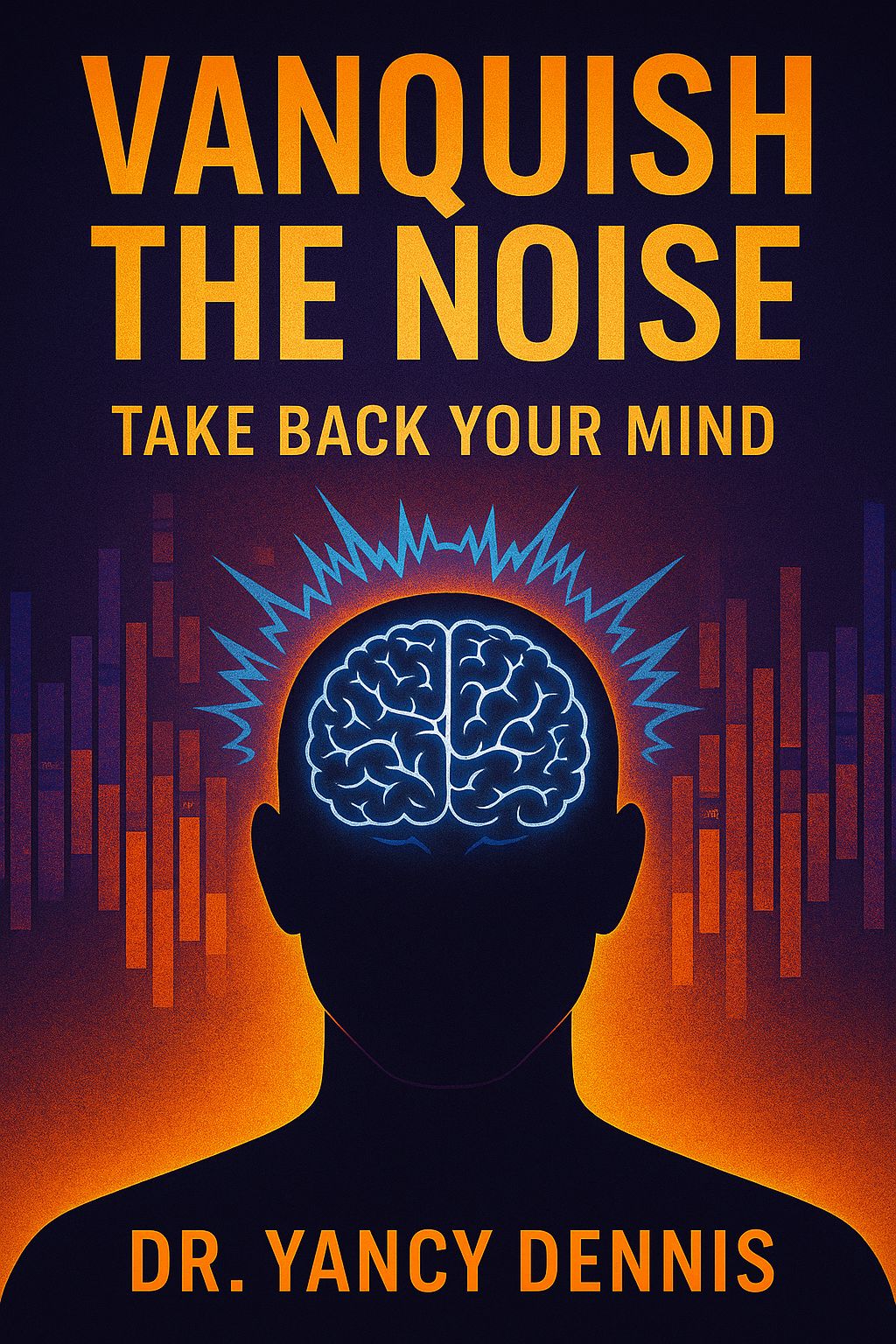
Vanquish the Noise — typeset with PublishJockey, live on Amazon.
See it on Amazon →📚
Free
Samples
Real Books, Real Authors
See what other authors published with PublishJockey
Download free sample copies — real books, real tables of contents, formatted entirely with PublishJockey.

The Digital SAT Math Playbook Excerpt
Master Desmos, Patterns, Shortcuts & the Fastest Path to the Answer

Your Child Is the Product
A Parent's Guide to Taking Back Control From Apps, Algorithms, and Digital Distraction

Be Your Own Bank
The Chris Naugle Way to Wealth, Freedom & Legacy
Your Word Doc Is a Mess. Your Book Won't Be.
Same content. Same tables. Same text. The only difference is PublishJockey.
Stop fighting formatting. Just write — we'll handle the rest.
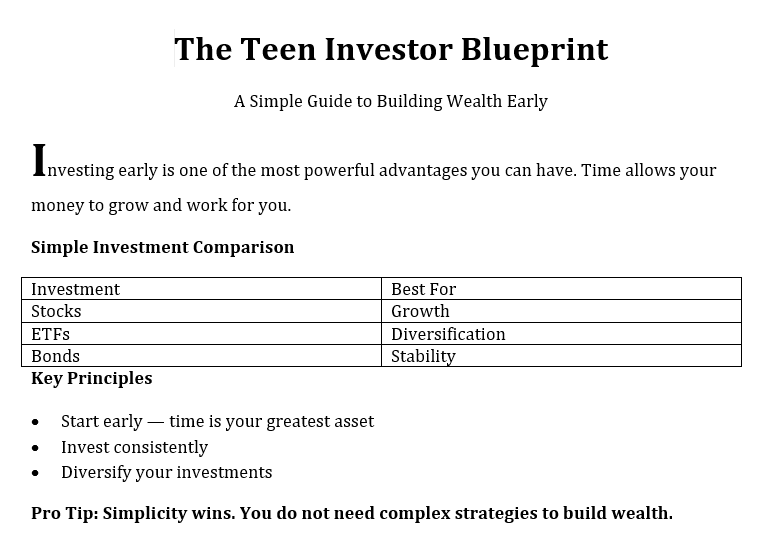
30 seconds.
No formatting.
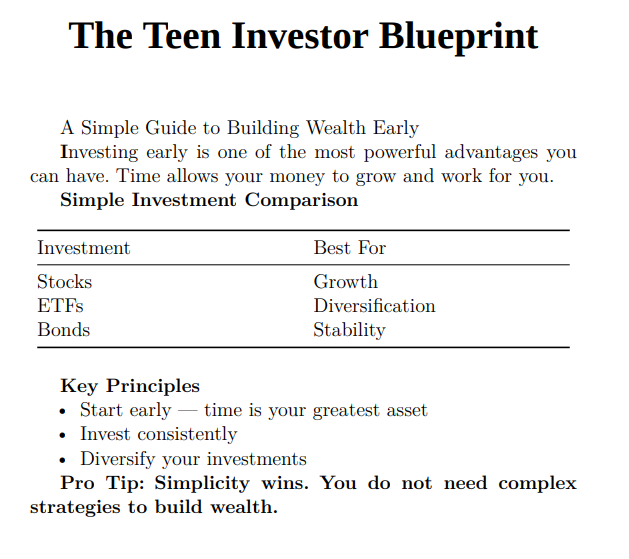
Real output from the same Word document — imported directly into PublishJockey
Generate your first 12 pages — no credit card required
The real cost of a professionally typeset book
Same print-ready quality. Any platform.
Freelance book designer
$800 – $3,000
Per book. Weeks of turnaround.
Vellum
$250
Mac only.
PublishJockey
$39+
Any device. Print-ready in 30 seconds.
See PublishJockey in Action
Formatted 100% using PublishJockey — no designers, no extra tools.
Free Cover Created using ChatGPT & Upscale Tool on this sitePublished on Amazon
This book was formatted and published using PublishJockey. See how our platform transforms your manuscript into a professional, print-ready book that meets Amazon's strict formatting requirements.
What this book demonstrates:
- Professional typesetting and layout
- Proper margins and spacing for print
- Clean, readable typography
- KDP-ready formatting standards
What Word-to-PDF Actually Creates
The 7 Amateur Tells
❌"Error! Bookmark not defined" everywhere
❌Pages numbered 1, 2, 3 all the way through
❌No drop caps (large first letters)
❌Cramped edge-to-edge text
❌Generic copyright page
❌Inconsistent chapter layouts
❌Overall "made in Word" feel
✅ PublishJockey fixes all 7 automatically
Just upload your Word doc → Professional book in ~30 seconds
↓ See Full Comparison Below ↓
Your Book Formatting Options, Compared
From DIY to Professional – What You Actually Get
Word-to-PDF
(DIY)PublishJockey
Atticus
Vellum
Professional
FormatterFree
(but unprofessional)$39+
starting price, less per book after$147
lifetime$250
one-time$2,500+
per book✅ Perfect EPUB TOC
PDF TOC included✅ Automatic elegant drop caps
10 professional styles✅ Publisher-grade
• Roman numerals (ii, iii)
• Optical spacing
• 7 professional elements
⚠️ Good
(Mac only)PDF + EPUB
(No Word)PDF + EPUB
(No Word)PDF + EPUB
(usually)✅ 80+ languages
(Tamil, Thai, Bengali)✅ ~30 seconds
(PDF ready)✅ Any device
(PC, Mac, Linux)Unlimited
(but looks bad at any length)✅ Unlimited - any size
50k to 500k words, same price (from $39)❌ Charges more for longer
$2,500 for 50k → $5,000 for 200kUnlimited
(errors remain)⚠️ "Good quality"
(Mac only)💡 The Real Cost Breakdown:
Word-to-PDF: Free, but your book looks amateur (costs you sales + credibility) • Professional Formatter: $2,500-5,000 per book (one book = 60+ PublishJockey books) • Vellum: $250 but Mac only, no Word export (locked into Mac) • Atticus: $147 but no Word export, no CSV, no cover (need other tools) • PublishJockey: from $39, any device, includes everything (format your entire backlist for less than Vellum)
Your Book Deserves Random House Quality
Start with professional quality. Upload your Word document and get a Random House-quality book in ~30 seconds.
Transform Your Manuscript Today
Transform your manuscript into a professional book in minutes, not months.
Built for Authors, Not Designers
You Write. We Handle the Rest.
Every feature exists to save you time and make your book look professionally published
Write Simply, Get a Pro Layout
Just type. Our built-in editor handles headings, lists, images, and tables without you touching a single formatting option.
See your book take shape in real time with instant preview — what you see is what gets printed.
Real-time preview as you type
Auto-saves every change
No learning curve
Bookstore-Quality Output
Your book gets the same typesetting treatment as traditionally published titles — proper page breaks, margins, and typography.
Upload directly to Amazon KDP, IngramSpark, or any print-on-demand service and pass quality checks the first time.
KDP-ready on first export
Proper widow & orphan control
10+ standard book sizes
Automatic Table of Contents
Stop building your TOC by hand. PublishJockey reads your chapter headings and generates a polished table of contents with page numbers.
Works in PDF, EPUB, and DOCX — with clickable links in digital formats so readers can jump to any chapter.
Generated in seconds, not hours
Customizable depth levels
Clickable navigation in e-books
Bring Your Existing Manuscript
Already written your book in Word or Google Docs? Import it directly — headings, tables, equations, and images all come through.
No copy-pasting, no reformatting. Your manuscript structure is preserved and auto-split into chapters.
Word (.docx) and Google Docs
Tables and equations preserved
Auto chapter splitting
One Click, Three Formats
Export to print-ready PDF, EPUB for e-readers, or DOCX — all from the same manuscript. No reformatting between versions.
PDF exports pass Amazon KDP and IngramSpark quality checks. EPUB files work on every major e-reader.
PDF in under 30 seconds
EPUB in 5 seconds
DOCX for final reviews
Your Books, Always Safe
Every project is saved automatically to the cloud. Start on your desktop, pick up on your laptop — nothing is ever lost.
Make unlimited revisions and re-export as many times as you need. Your manuscript is always one click away.
Automatic cloud backups
Work from any device
Built for Every Kind of Author
Whatever you're writing, there's a workflow for it
From dissertations to workbooks to fiction, see how PublishJockey fits your specific project.
PublishJockey runs your manuscript through the same XeLaTeX pipeline academic typesetters use — publisher-grade structure, spacing, and pagination — without you touching a single LaTeX command.
Learn more →
PublishJockey supports 98 language variants across 70+ languages, including Hindi, Tamil, Bengali, and multiple African languages — with correctly localized book structure and copyright pages built in.
Learn more →
BookBuilder takes the manuscript you already have — including AI-drafted chapters — and turns it into a structured book project. No re-typing, no learning a new writing tool first.
Learn more →
Publisher-grade typesetting in under 30 seconds — so your book looks as credible as your expertise, without a $2,500 formatting invoice.
Learn more →
Structured content, clean chapter splits, and export to print and digital formats — built for workbooks and curriculum, not just linear prose.
Learn more →
12 chapter title styles and 10 drop cap styles give your fiction or poetry collection the literary interior design readers associate with traditional publishing.
Learn more →
Test-prep and educational content lives or dies on structure — problem sets, tables, and answer keys that need to survive export intact, in every format students actually use.
Learn more →
Simple Process
How it Works
From manuscript to published book in four simple steps
Import or Create
Start by importing your existing manuscript or create a new one from scratch using our intuitive markdown editor.
Edit and Format
Use our intuitive markdown editor to write and format your content with real-time previews as you work.
Preview and Refine
Preview how your book will look when published and make adjustments to layout and structure as needed.
Export and Publish
Export your book in PDF or EPUB format, ready to upload to platforms like Amazon KDP or IngramSpark.
Import or Create
Start by importing your existing manuscript or create a new one from scratch using our intuitive markdown editor.
Edit and Format
Use our intuitive markdown editor to write and format your content with real-time previews as you work.
Preview and Refine
Preview how your book will look when published and make adjustments to layout and structure as needed.
Export and Publish
Export your book in PDF or EPUB format, ready to upload to platforms like Amazon KDP or IngramSpark.
Pricing Plans
The more you publish, the less each book costs
One tiered price for every book — no bundles to pick between.
Try It Free
1 book project, export limited to the first 12 pages, 2 images included — no card required.
Buy Books
Full export, watermark-free, unlimited pages, 10 images per book.
How many books?
| Book 1 | $39.00 |
| Subtotal | $39.00 |
| Total | $39.00 |
Image Upgrade
+100 additional images, works with any book, no expiration — $25
Publishing a large batch of books (agency, imprint, or bulk backlist)?
Questions & Answers
Frequently Asked Questions
Everything you need to know about Publish Jockey
General
Who is PublishJockey designed for?
PublishJockey is perfect for: 뿯ν뿯½뿯½ **Authors & Self-Publishers:** Create professional books without hiring a designer 뿯ν뿯½뿯½ **Coaches & Consultants:** Transform training materials into premium-looking guides 뿯ν뿯½뿯½ **Educators & Researchers:** Publish academic papers and course materials professionally 뿯ν뿯½뿯½ **Businesses:** Produce whitepapers, reports, and documentation that command respect 뿯ν뿯½뿯½ **Content Creators:** Anyone who wants their written work to look as professional as it sounds If you're serious about how your work is perceived, PublishJockey bridges the gap between writing and publishing.
Product Comparison
What's the difference between Word-to-PDF and PublishJockey?
The difference is substantial. Independent evaluations by Claude and ChatGPT scored PublishJockey at 96/100 (A+) versus Word-to-PDF at 66/100 (D). PublishJockey delivers: 뿯ν뿯½뿯½ Perfect table of contents with zero errors (vs Word's "Error! Bookmark not defined") 뿯ν뿯½뿯½ Professional book layout with balanced margins (vs Word's standard document look) 뿯ν뿯½뿯½ Publication-ready typography and font rendering (vs Word's generic, uneven spacing) 뿯ν뿯½뿯½ Proper metadata and accessibility tagging (vs Word's minimal structure) 뿯ν뿯½뿯½ Print-ready files that pass preflight checks (vs Word's files requiring major fixes) A Word-to-PDF says "here's my document." A PublishJockey PDF says "here's my book."
Why can't I just use Microsoft Word to create my PDF?
Word is an incredible writing tool, but it's not a publishing tool. Word-to-PDF exports suffer from: 1. Broken TOCs & Field Codes: The infamous "Error! Bookmark not defined." ruins professional credibility 2. No Publishing Logic: Word doesn't understand front matter, roman numerals, or design rhythm 3. Rigid Layout Engine: Margins, text flow, and typography are mechanical, not artistic 4. Lack of Metadata: Word exports don't optimize for searchability, accessibility, or navigation 5. Time Lost in Post-Processing: Hours spent fixing issues that still look "office-made," not "publisher-made" PublishJockey was built specifically for authors, educators, and professionals who want publication-quality results automatically.
Quality & Validation
What do independent evaluations say about PublishJockey?
We conducted two independent AI evaluations comparing PublishJockey with Word-to-PDF: **Claude's Evaluation:** 뿯ν뿯½뿯½ Visual Design & Layout: 96/100 (PJ) vs 68/100 (Word) 뿯ν뿯½뿯½ Typography & Font Rendering: 94/100 (PJ) vs 72/100 (Word) 뿯ν뿯½뿯½ Table of Contents: 98/100 (PJ) vs 45/100 (Word) 뿯ν뿯½뿯½ Professional Readiness: 97/100 (PJ) vs 62/100 (Word) 뿯ν뿯½뿯½ Overall: 96.3/100 (A+) vs 66.4/100 (D) **ChatGPT's Evaluation:** 뿯ν뿯½뿯½ Typography & Fonts: 92/100 (PJ) vs 75/100 (Word) 뿯ν뿯½뿯½ TOC Functionality: 90/100 (PJ) vs 60/100 (Word) 뿯ν뿯½뿯½ Accessibility & Structure: 90/100 (PJ) vs 65/100 (Word) 뿯ν뿯½뿯½ Professional Readability: 97/100 (PJ) vs 68/100 (Word) 뿯ν뿯½뿯½ Overall: 93/100 (A) vs 72/100 (C-) Both evaluators concluded: PublishJockey produces near-publication-ready PDFs that meet industry standards.
How can readers tell the difference between an amateur PDF and a professional one?
Readers may not consciously notice specific technical details, but they absolutely feel the difference: **Amateur PDFs (Word-to-PDF):** 뿯ν뿯½뿯½ Feel like office documents 뿯ν뿯½뿯½ Uneven spacing and margins 뿯ν뿯½뿯½ Generic, default fonts 뿯ν뿯½뿯½ Broken navigation links 뿯ν뿯½뿯½ Impression: "work in progress" **Professional PDFs (PublishJockey):** 뿯ν뿯½뿯½ Feel like published books 뿯ν뿯½뿯½ Balanced, breathing layout 뿯ν뿯½뿯½ Crisp, optimized typography 뿯ν뿯½뿯½ Perfect navigation structure 뿯ν뿯½뿯½ Impression: "crafted, intentional, premium" The distinction is both technical and emotional. Professional presentation builds trust and perceived value.
Features
What does PublishJockey do that other tools don't?
PublishJockey goes far beyond basic PDF conversion: **Professional Design Intelligence:** 뿯ν뿯½뿯½ Automatically applies roman numerals for front matter (ii, iii, iv뿯ν뿯½뿯½) 뿯ν뿯½뿯½ Balanced margins and page alignment 뿯ν뿯½뿯½ Consistent typography and line height **Technical Perfection:** 뿯ν뿯½뿯½ Zero broken bookmarks or rendering errors 뿯ν뿯½뿯½ Every TOC link, heading level, and page number works flawlessly **Built-In Metadata:** 뿯ν뿯½뿯½ Proper tagging for easy navigation on any device 뿯ν뿯½뿯½ Improved discoverability and accessibility **Print & eBook Ready:** 뿯ν뿯½뿯½ Files pass preflight checks for Amazon KDP, IngramSpark, and other platforms 뿯ν뿯½뿯½ Zero edits needed before upload **Typography That Breathes:** 뿯ν뿯½뿯½ Crisp, properly embedded fonts 뿯ν뿯½뿯½ Optimized for readability and professional appearance
Technical
Will my PublishJockey PDFs work with Amazon KDP, IngramSpark, and other platforms?
Yes! PublishJockey PDFs are designed to pass preflight checks for all major publishing platforms including: 뿯ν뿯½뿯½ Amazon KDP (Kindle Direct Publishing) 뿯ν뿯½뿯½ IngramSpark 뿯ν뿯½뿯½ Draft2Digital 뿯ν뿯½뿯½ Lulu 뿯ν뿯½뿯½ Barnes & Noble Press 뿯ν뿯½뿯½ Apple Books Our files include proper metadata, embedded fonts, and correct structure that professional platforms require. You can upload directly without reformatting or fixing errors.
What file formats does PublishJockey support?
PublishJockey accepts standard manuscript formats and outputs professional-grade PDFs optimized for both print and digital distribution. Our output files include: 뿯ν뿯½뿯½ High-quality PDF with embedded fonts 뿯ν뿯½뿯½ Proper bookmarks and navigation structure 뿯ν뿯½뿯½ Metadata for searchability 뿯ν뿯½뿯½ Both print-ready and screen-optimized versions Your files are ready for immediate distribution or platform upload.
What professional typesetting capabilities does PublishJockey support?
PublishJockey uses an advanced XeLaTeX-based typesetting engine with a comprehensive library of professional packages. You don't need to know any of this to use the platform — it all works automatically behind the scenes. Here's what powers your book: **Typography & Layout** • Microtype — Subtle character protrusion and font expansion for optically perfect margins • Lettrine — Beautiful drop caps at the start of chapters • Setspace — Precise line spacing control • Ragged2e — Smart text justification and alignment • Hyphenat — Intelligent word hyphenation • Enumitem — Professionally formatted lists and bullet points **Tables & Figures** • Longtable — Tables that span multiple pages automatically • Booktabs — Publisher-quality table rules and spacing • Tabularx — Auto-adjusting column widths • Float & Caption — Precise image and table placement with captions • Graphicx & Adjustbox — Full image handling with scaling, rotation, and cropping **Math & Equations** • AMS Math & AMS Symb — Full mathematical equation support (imported directly from Word) • Mathspec — Custom math fonts that match your book's typography **Colored Boxes & Callouts** • Tcolorbox — Info boxes, warning boxes, tip boxes, and note boxes • Color-coded problem boxes — Green, yellow, and red difficulty-tagged boxes (great for workbooks) • Stop boxes — Highlighted attention boxes for important content **Structure & Navigation** • Titlesec & Sectsty — 10 professional chapter title styles • Tocbibind — Automatic table of contents generation • Hyperref — Clickable links and cross-references in digital formats • Etoolbox — Smart conditional formatting **Fonts & Languages** • Fontspec — Full Unicode font support with 40+ professional typefaces • Polyglossia — Native support for 80+ languages including Hindi, Tamil, Bengali, Arabic, and African languages • Bidi — Full right-to-left (RTL) support for Arabic, Hebrew, and Urdu • XColor — Full color support throughout your book **Diagrams & Charts** • TikZ — Vector diagrams and custom visual layouts • PGFPlots — Data charts and plots with publication-quality output **Science & Units** • SIUnitX — Proper scientific numbers, measurements, and units **Code Listings** • Listings — Clean source code formatting with line wrapping and framed blocks **URL & Link Handling** • URL & XUrl — Clean URL formatting with automatic line breaking • Seqsplit — Long text and code wrapping All of this is handled automatically when you export. You just write — PublishJockey takes care of the rest.
Pricing
What pricing plans are available?
PublishJockey offers flexible pricing to fit your publishing needs: **Standard Plans (Print Books):** 뿯ν뿯½뿯½ Single Book: Perfect for first-time authors 뿯ν뿯½뿯½ 5 Book Pack: For multiple titles or series 뿯ν뿯½뿯½ 10 Book Pack: For active authors 뿯ν뿯½뿯½ 20 Book Pack: For prolific writers 뿯ν뿯½뿯½ 50 Book Power Pack: For power users 뿯ν뿯½뿯½ 100 Book Agency Pack: For agencies and publishers **eBook Plans:** 뿯ν뿯½뿯½ Same structure as standard plans, optimized for digital formats **Full Service Plans:** 뿯ν뿯½뿯½ Full Service: Complete professional assistance 뿯ν뿯½뿯½ Full Service Plus: Premium hands-on support **Add-ons:** 뿯ν뿯½뿯½ Additional books as needed 뿯ν뿯½뿯½ Image purchase packs All plans include professional formatting, zero broken TOCs, and publication-ready output. Check our pricing page for current rates and special offers.
Do you offer a money-back guarantee?
We stand behind the quality of PublishJockey. If you're not satisfied with the professional results, contact our support team. We're committed to ensuring your publishing success and will work with you to resolve any concerns.
Process
How long does it take to create a professional PDF?
PublishJockey processes your manuscript in minutes, not days. Our automated professional publishing engine: 1. Analyzes your content structure 2. Applies professional design rules 3. Generates perfect table of contents 4. Optimizes typography and layout 5. Creates publication-ready PDF What would take hours of manual formatting in Word happens automatically, giving you more time to focus on writing and marketing your work.
Do I need design or technical experience to use PublishJockey?
Not at all! PublishJockey handles all the technical complexity for you. You don't need to know about: 뿯ν뿯½뿯½ Typography and font selection 뿯ν뿯½뿯½ Margin calculations and page layout 뿯ν뿯½뿯½ PDF metadata and structure 뿯ν뿯½뿯½ Bookmarks and navigation 뿯ν뿯½뿯½ Print specifications Our professional design intelligence applies best practices automatically. You focus on your content; we handle the professional presentation.
Can I make changes after generating my PDF?
Yes! You can update your content and regenerate your professional PDF as many times as needed within your plan limits. Each generation applies the same professional standards, ensuring consistency across all versions of your work.
Common Issues
Why does Word create broken table of contents with 'Error! Bookmark not defined'?
This is one of the most common and frustrating issues with Word-to-PDF exports. It happens because: 뿯ν뿯½뿯½ Word uses field codes that break during PDF conversion 뿯ν뿯½뿯½ Bookmark references don't translate properly to PDF format 뿯ν뿯½뿯½ Manual TOC updates are required but often missed 뿯ν뿯½뿯½ Word's export process isn't designed for publishing PublishJockey eliminates this problem entirely. Our system generates perfect, error-free table of contents with working links every single time. This alone is worth switching from Word-to-PDF.
Support
What kind of support is available?
We're here to help you succeed: 뿯ν뿯½뿯½ Email support for all users 뿯ν뿯½뿯½ Detailed documentation and guides 뿯ν뿯½뿯½ Video tutorials and best practices 뿯ν뿯½뿯½ Full Service plans include hands-on assistance 뿯ν뿯½뿯½ Community resources and tips Our goal is to make professional publishing accessible to everyone, regardless of technical experience.
Legal & Rights
How does PublishJockey handle copyright protection for my work?
Copyright protection is a legal right, not a technical one. This means no software application can prevent others from copying or misusing your work 뿯ν뿯½뿯½ only the law can enforce copyright. However, with our system, you retain full copyright and ownership of everything you upload and create. We never claim rights to your content, and we only use it to provide the services you've requested. Your materials remain your intellectual property at all times.
Should I register my copyright with the U.S. Copyright Office?
When you publish your book, you automatically own the copyright from that moment뿯ν뿯½뿯½it's your original work. However, if you want the ability to sue for infringement in federal court and be eligible for statutory damages and attorney's fees, you can register your copyright with the U.S. Copyright Office. This is optional but provides stronger legal protection. Registration typically costs around $45뿯ν뿯½뿯½$65, depending on the filing method.
Can't find the answer you're looking for?
Our support team is ready to help you with any questions or concerns.